CT FileMaker Developer Group – System Notifications with FMP 2024

8/21/2024 – This month, Robert Naud will take a look at a feature which, although first introduced for FileMaker Go, FileMaker 2024 now makes available to FileMaker Pro. We’re talking about system notifications! Even though we’ve managed to do without them for a long time, they offer us interesting opportunities to interact with the users of our applications. We look forward to seeing you there!


Maximizing Sales Efficiency with Custom FileMaker Solutions

In the competitive world of sales, efficiency and agility can make the difference between closing a deal and losing an opportunity. Custom FileMaker solutions offer a transformative approach to streamlining sales processes, reducing administrative burdens, and providing real-time insights, ultimately driving increased sales efficiency and topline revenue growth.

Streamlining Sales Processes

Sales processes often involve multiple stages, from lead generation to customer follow-up, each requiring meticulous attention to detail. Custom FileMaker solutions simplify these processes by integrating various sales functions into a single, cohesive platform. Whether it’s managing customer relationships, tracking sales pipelines, or automating follow-ups, FileMaker can be tailored to fit the unique workflows of any sales team.

For instance, a custom FileMaker solution can automatically route leads to the appropriate sales representatives based on predefined criteria, ensuring timely and accurate lead management. This not only speeds up the sales cycle but also enhances the chances of conversion by ensuring that leads are handled by the most suitable team members. Additionally, automated reminders and task assignments ensure that no critical steps are overlooked, fostering a more organized and proactive sales approach.

Reducing Administrative Tasks

One of the most significant challenges sales teams face is the burden of administrative tasks. Data entry, report generation, and manual tracking can consume valuable time that could otherwise be spent engaging with prospects and closing deals. Custom FileMaker solutions alleviate this burden by automating many of these tasks, allowing sales teams to focus on what they do best—selling.

With FileMaker, data from various sources can be seamlessly integrated and updated in real-time, eliminating the need for manual data entry. Custom dashboards can provide instant access to key metrics and performance indicators, enabling sales managers to generate reports with just a few clicks. This not only reduces the time spent on administrative tasks but also improves data accuracy and consistency, leading to better decision-making and more effective sales strategies.

Providing Real-Time Insights

In today’s fast-paced business environment, having access to real-time insights is crucial for making informed decisions and staying ahead of the competition. Custom FileMaker solutions provide powerful analytics and reporting capabilities, enabling sales teams to monitor performance, identify trends, and adjust strategies on the fly.

For example, sales managers can use custom dashboards to track key performance indicators such as lead conversion rates, sales cycle length, and revenue targets. Real-time data visualization tools allow for quick analysis and identification of areas that require attention or improvement. Additionally, predictive analytics powered by FileMaker can forecast future sales trends based on historical data, helping sales teams to proactively address potential challenges and capitalize on emerging opportunities.

Maximizing sales efficiency is essential for driving topline revenue growth and maintaining a competitive edge. Custom FileMaker solutions offer a versatile and powerful platform for streamlining sales processes, reducing administrative tasks, and providing real-time insights. By leveraging the capabilities of FileMaker, sales teams can enhance their productivity, make data-driven decisions, and ultimately achieve greater success in their sales efforts. Embracing custom FileMaker solutions is not just an investment in technology, but a strategic move towards a more efficient and effective sales operation.

If you want to learn more about how FileMaker can empower your teams, you can reach out to us here.

How Custom FileMaker Solutions Fit Your Budget

We live in an age where entire industries seem to spring up overnight. New ideas and innovations are turned into powerful products and services. Technology and creativity allow us to fill hyper-specialized niches, and build viable businesses serving very specific customer segments. “Niche businesses” could refer to something as popular as a hot yoga studio or ecommerce business, or something as specific as a manufacturer of highly-specialized tools for commercial plumbers.

Regardless of the industry you find yourself in, these specialized business ventures often require specialized tools themselves. An out-of-the-box CMS or point-of-sale software just doesn’t cut it. “Custom” is often correlated with “expensive.” But in the case of custom FileMaker solutions, that isn’t the case.

Flexibility and Scalability

One of the most significant advantages of custom FileMaker solutions is their flexibility and scalability. Unlike off-the-shelf software, which often forces you to adapt your business processes to fit its design, a custom FileMaker solution is built around your specific requirements. This means you only pay for the features you need, avoiding the unnecessary costs associated with generic software.

As your business grows, your software needs will evolve. FileMaker solutions can be easily scaled to accommodate this growth. Whether you need to add more users, integrate new features, or expand functionality, custom FileMaker solutions can be adapted without the high costs associated with switching to a new system.

Reduced Licensing Fees

Off-the-shelf software typically involves recurring licensing fees, which can add up over time. For instance, a software package that costs $100 per user per month for a team of 50 can result in an annual expense of $60,000. In contrast, custom FileMaker solutions usually involve a one-time development cost with significantly lower ongoing maintenance fees. This pricing model can result in substantial savings, especially for businesses with many users.

Customization for Specific Needs

One size does not fit all when it comes to business software. Generic software often includes features that your business may never use, yet you still pay for them. With a custom FileMaker solution, the software is designed specifically for your business processes. This customization ensures that you get the exact functionality you need, enhancing productivity and efficiency.

For example, if your business requires a unique workflow for managing client information, a custom FileMaker solution can be built to streamline this process. This tailored approach not only saves time but also reduces costs by eliminating the need for workarounds or additional software.

Integration with Existing Systems

Many businesses use multiple software systems to manage different aspects of their operations. Integrating these systems can be complex and costly, especially with off-the-shelf software that may not be designed for interoperability. Custom FileMaker solutions, however, can be built to integrate seamlessly with your existing systems. This integration capability reduces the need for manual data entry and minimizes errors, saving both time and money.

For instance, a custom FileMaker solution can be integrated with your accounting software, CRM, and other business applications. This seamless integration ensures that data flows smoothly between systems, enhancing overall efficiency and reducing operational costs.

Lower Training Costs

Training employees to use new software can be time-consuming and expensive. Off-the-shelf software often comes with a steep learning curve, requiring extensive training to ensure that all employees can use it effectively. Custom FileMaker solutions, however, are designed to be intuitive and user-friendly. Since they are tailored to your existing processes, employees can adapt more quickly, reducing the time and costs associated with training.

Enhanced Security and Compliance

Data security is a critical concern for businesses of all sizes. Off-the-shelf software may not offer the level of security or compliance required for your industry. Custom FileMaker solutions can be built with robust security features tailored to your specific needs, ensuring that sensitive data is protected. This customization can help you avoid costly data breaches and ensure compliance with industry regulations.

Custom FileMaker solutions offer a cost-effective alternative to off-the-shelf software, providing flexibility, scalability, and tailored functionality. By reducing licensing fees, lowering training costs, and integrating seamlessly with existing systems, these solutions can fit within your budget while meeting your specific business needs. Investing in a custom FileMaker solution can lead to significant cost savings and improved operational efficiency, making it a smart choice for businesses looking to optimize their software investments.

If you’re looking for ways FileMaker can help you, reach out to Kyo Logic here. We’ll provide a free consultation and walk you through opportunities and options.


CT FileMaker Developer Group – What’s New in FileMaker 2024?

7/17/2024 – This month, Douglas Wallis, Product Manager at Claris, will be joining us to present the new features included in the recent release of FileMaker 2024. In addition, Steven Blackwell will be showing the group a couple major security issues that the FileMaker 2024 release has resolved.


The ROI of Custom Software Development: Calculating the Cost Savings of a Custom FileMaker Solution

In the competitive landscape of modern business, efficient and effective operations are critical. Many companies find themselves trapped between the high costs of off-the-shelf software and the inefficiencies of manual processes. Custom software development, particularly using platforms like FileMaker, offers a compelling alternative that can deliver substantial return on investment (ROI).

Direct Cost Savings

1. Reduced Licensing Fees

Off-the-shelf software often comes with recurring licensing fees that can add up significantly over time. Custom FileMaker solutions, on the other hand, involve a one-time development cost with minimal recurring expenses. For example, a business paying $100 per user per month for a software license with 50 users incurs an annual cost of $60,000. A custom solution could dramatically reduce or even eliminate these ongoing fees.

2. Tailored Functionality

Out-of-the-box software may include features that are unnecessary for your business, or it might lack critical functionalities, requiring additional third-party integrations. Custom FileMaker solutions are built to fit your exact needs, ensuring that you are only paying for what you use. This tailored approach not only reduces costs but also increases efficiency, as employees spend less time navigating unnecessary features or seeking workarounds.

3. Improved Efficiency and Productivity

Manual processes are time-consuming and prone to errors. Custom software can automate routine tasks, reduce errors, and streamline workflows. For instance, if a custom FileMaker solution saves each employee just one hour per week, for a company with 50 employees, that’s 2,600 hours saved annually. Assuming an average hourly wage of $25, this translates to $65,000 in labor cost savings per year.

Indirect Cost Savings

1. Scalability and Flexibility

Custom solutions are designed to grow with your business. Unlike off-the-shelf software that might require expensive upgrades or new licenses as your business expands, a FileMaker solution can be scaled and modified to meet your changing needs at a lower incremental cost. This flexibility prevents the disruption and costs associated with migrating to new systems.

2. Enhanced Data Security

Data breaches can be costly, both in terms of financial loss and reputational damage. Custom FileMaker solutions offer enhanced security tailored to your business’s specific requirements, reducing the risk of breaches. A secure, custom-built database ensures that sensitive information is protected, potentially saving millions in breach-related costs.

3. Reduced Training Costs

With custom software, training costs are typically lower because the system is built around your existing workflows and processes. Employees can adapt more quickly to a familiar interface designed to meet their specific needs, reducing the time and cost associated with training on new, generic software platforms.

Calculating Your Potential ROI

To calculate the potential ROI of a custom FileMaker solution, consider the following steps:

  1. Identify Current Costs: Calculate your current software licensing fees, labor costs for manual processes, costs of inefficiencies, and any other relevant expenses.
  2. Estimate Development Costs: Obtain a detailed quote for the custom FileMaker solution, including initial development and ongoing maintenance costs.
  3. Project Savings and Revenue: Estimate the cost savings from reduced licensing fees, improved efficiency, and other direct and indirect benefits. Also, consider any potential revenue increases from enhanced productivity and new capabilities.

Investing in a custom FileMaker solution offers significant cost savings and operational benefits over off-the-shelf software and manual processes. By carefully calculating the ROI, businesses can make informed decisions that align with their long-term strategic goals. Custom software development not only addresses specific business needs more effectively but also delivers a competitive edge through increased efficiency, flexibility, and security.

If you’re looking for ways FileMaker can help you, reach out to Kyo Logic here. We’ll provide a free consultation and walk you through opportunities and options.
CT FileMaker Developer Group – AI in FileMaker

5/29/2024 – This month, we will be discussing the topic of AI in FileMaker. Please come prepared to discuss your experience with AI in FileMaker and to present any AI integrations you may have come up with.


CT FileMaker Developer Group – Engage Presentations Recap & Discussion

4/24/2024 – This month, we will be recapping and discussing our favorite Claris Engage presentations. Please come prepared to discuss the presentations you found most interesting and enlightening.


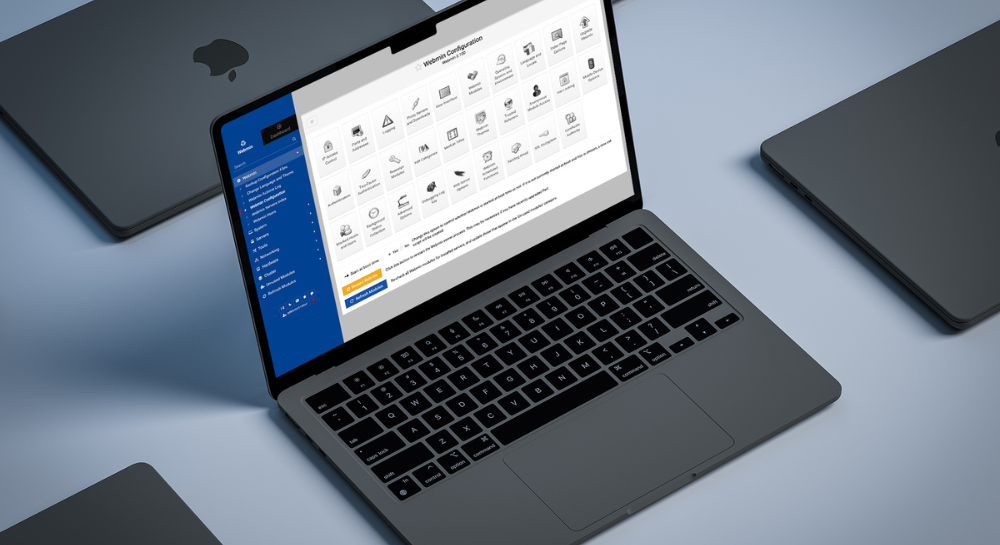
CT FileMaker Developer Group – Webmin Server GUI Tool

4/19/2023 – This month, Oliver Reid will be presenting the Webmin GUI tool for Claris Server on Linux. Webmin provides all tools needed managing a Claris (or FileMaker) Linux server. Those who have becomes used to a Mac or Windows GUI will find Webmin as easy, if not easier, to use to upload, download and organize files for a Claris Server, set up OS level cron jobs, set ownership and permission for files and folders, and install ODBC drivers to support ESS, and more.


CT FileMaker Developer Group – KyoSync II & Engage Recap

3/27/2024 – This month, John Mathewson of Kyo Logic will be sharing KyoSync II, which was unveiled at Claris Engage. John will relate how his team reliably syncs two FileMaker systems, even when one server is remote and has limited access. You’ll also get an inside look at KyoSync II, the technology that made this all possible.

In addition, we will also be reviewing Claris Engage and discussing the new ideas and trends that came out of the event.


Kyo Logic and FMPConnect Present: A Step-by-Step Guide for Installing Webmin & Claris FileMaker Server

Kyo Logic has partnered with Oliver Reid and his company FMPConnect to provide an incredibly potent guidebook. You can click below right now to get an in-depth guide on exactly how to install Webmin and FileMaker Server on an Amazon Web Service (AWS) Ubuntu Virtual Instance.

DOWNLOAD


Installing with Webmin is perfect for IT professionals and developers who just don’t have extensive experience with Linux. As powerful as Linux is, it can be cumbersome to navigate if you’re unfamiliar, and can take valuable time to gain competency. But when you have access to Webmin, it simplifies the entire process. Everything is managed through Webmin’s GUI instead of having to manually edit configuration files or run commands.


While getting Webmin and FileMaker Server to work well with Ubuntu has historically been difficult, this guide provides a fast, consistent way to successfully set up both applications. By utilizing this guide, you can have everything up and running in just 20 minutes (not including downloads).


Everyone at Kyo Logic and FMPConnect thought this information was too impactful to keep to ourselves. We want to make sure everyone in the community has access to this process, as we believe the iterative, collaborative nature of the Claris community is what makes it so great.


Oliver Reid’s guide goes over every step of the process, from how to configure your Linux accounts to security and using Webmin to upload or download files to and from FileMaker Server. The guide includes:

  • Linux User Accounts, Permissions, and Directories Overview
  • Linux Repositories and Package Managers
  • Setting up an AWS Ubuntu Server
  • Connecting to the AWS Ubuntu Server
  • Installing Webmin
  • Installing FileMaker Server
  • Saving the AWS instance as an “AMI”
  • Securing Webmin with an SSL certificate
  • Uploading and Downloading FileMaker Server files using Webmin


Grab the guide now, and you’ll have detailed, step-by-step instructions paired with informative infographics and tables to make this previously impossible task feel effortless.


Check out FMPConnect for more great FileMaker and JSON tools. And follow Kyo Logic on LinkedIn to get access to more great guides and resources like this one.


We will be elaborating on this guide with additional details in the future. Stay tuned!