Signs It’s Time to Modernize Your Systems

Most organizations don’t wake up one morning and decide they’ve outgrown their systems.

Instead, the signs appear gradually. Reporting takes a little longer. Teams build another spreadsheet. Employees spend more time searching for information than acting on it. Individually, these issues seem manageable. Together, they’re often clear indicators that your business has reached the limits of its existing infrastructure.

If several of these warning signs sound familiar, it may be time to modernize your operational systems.

1. Reporting Takes Longer Every Month

If producing weekly or monthly reports requires pulling data from multiple spreadsheets or systems, your reporting process is no longer scaling with your business.

2. Teams Enter the Same Information More Than Once

Duplicate data entry wastes time and creates inconsistencies. When Sales, Operations, Purchasing, and Finance all maintain their own records, efficiency suffers.

3. Critical Processes Depend on Specific Employees

If only one person knows how a spreadsheet works or understands a particular workflow, you’ve created a single point of failure.

4. Simple Questions Take Too Long to Answer

Questions like:

  • Where is this order?

  • Is production on schedule?

  • Has this invoice been approved?

shouldn’t require multiple phone calls or spreadsheet searches.

5. Workflows Depend on Email

When approvals, updates, and status changes are managed through inboxes instead of systems, delays become inevitable.

6. Every New Customer Adds More Complexity

Growth should improve profitability, not increase operational chaos.

If every new customer creates more spreadsheets, manual work, or meetings, your systems aren’t scaling.

7. Different Departments Report Different Numbers

When leadership spends meetings reconciling reports instead of making decisions, it’s usually because there isn’t a single source of truth.

8. Every New Problem Gets Another Spreadsheet

Workarounds are helpful in the short term, but they shouldn’t become permanent infrastructure.

Modernization Doesn’t Mean Starting Over

Modernizing your systems doesn’t necessarily require replacing every application. In many cases, organizations achieve significant improvements by connecting existing systems, automating manual workflows, and centralizing operational information with Claris FileMaker.

This approach preserves existing investments while improving visibility, collaboration, and efficiency.

Why This Matters

Businesses evolve. Their systems should evolve with them.

Recognizing these warning signs early helps organizations modernize before operational bottlenecks begin limiting growth.

Modernization isn’t about adopting new technology for its own sake. It’s about building systems that support the business you’ve become, not the business you were five years ago.

Interested in evaluating whether your systems are ready for the next stage of growth? Reach out to Kyo Logic here.


 

Why Are Your Best Employees Often Backlogged?

High-performing employees are essential to growth. But in many organizations, they unintentionally become bottlenecks.

The reason isn’t effort.

It’s infrastructure.

When critical knowledge, approvals, spreadsheet logic, or operational expertise is held by a small number of key people, those employees become overloaded—and organizational throughput slows.

How Top Performers Become Bottlenecks

This often happens when strong employees take ownership of:

  • Custom spreadsheets
  • Complex reporting
  • Approval chains
  • Scheduling decisions
  • Pricing logic
  • Workflow exceptions

Because they’re trusted and capable, more responsibilities naturally flow to them.

The Operational Risk

Over time, this creates several problems:

  • Delays waiting for approvals
  • Reduced scalability
  • Burnout among top performers
  • Slower onboarding for others
  • Fragile processes dependent on specific individuals

Instead of amplifying growth, these employees become throughput caps.

Why It’s Hard to Spot

Backlogged top performers are often seen as simply “busy” or “important.”

But a chronic backlog usually signals that processes aren’t sufficiently systematized.

When too much operational logic lives with individuals rather than in systems, growth slows.

Embedding Knowledge into Systems

This is where Claris FileMaker creates leverage. By translating process knowledge into structured workflows, organizations can:

  • Automate approvals
  • Standardize quoting or reporting logic
  • Reduce dependency on individuals
  • Distribute operational visibility
  • Scale processes without overloading top performers

The goal is to free key employees to focus on strategic work—not repetitive operational management.

Why This Matters

Your best employees should drive growth, not limit it.

When systems absorb operational complexity, high performers become force multipliers instead of bottlenecks.

If your strongest employees are consistently backlogged, the problem may not be staffing. It could be infrastructure. Building scalable systems with Claris FileMaker helps reduce dependency on individuals and unlock broader organizational capacity.

Interested in reducing operational bottlenecks with Claris FileMaker? Reach out to Kyo Logic here.

Why Does Growth Feel Noisier Than It Should?

Growth is supposed to be exciting.

More customers, more orders, more revenue, more opportunity.

But for many organizations, growth doesn’t just feel bigger. It feels noisier. Communication becomes chaotic. Reporting gets harder. Teams feel busier, but progress seems less clear.

The issue often isn’t growth itself. It’s that systems haven’t matured alongside it.

What “Noisy” Growth Looks Like

As organizations expand without upgrading infrastructure, symptoms often include:

  • More spreadsheets
  • More status meetings
  • More approvals
  • More manual reconciliations
  • More cross-team coordination
  • More exceptions and workarounds

Everything feels louder, but not necessarily more efficient.

Why Growth Magnifies Weak Systems

When systems are immature:

  • Existing inefficiencies scale with volume
  • Fragmented processes create more friction
  • Communication replaces automation
  • Visibility decreases as complexity rises

Instead of streamlined growth, organizations experience operational noise.

The Hidden Cost of Noisy Operations

Noisy growth creates:

  • Slower execution
  • Leadership fatigue
  • Reduced agility
  • Increased employee burnout
  • Difficulty identifying true priorities

Without mature systems, growth can feel more chaotic than strategic.

Creating Operational Maturity

A platform like Claris FileMaker helps organizations mature operationally by:

  • Centralizing workflows
  • Reducing process fragmentation
  • Automating repetitive coordination
  • Standardizing reporting
  • Providing real-time visibility

As infrastructure improves, growth becomes cleaner, more manageable, and more sustainable.

Why This Matters

Growth should increase leverage, not confusion.

The right systems reduce operational noise and allow organizations to scale with confidence.

If growth feels noisier than it should, it may be a sign that your infrastructure hasn’t evolved alongside your business. Claris FileMaker helps organizations replace noise with structure, which allows growth to feel strategic again.

Interested in building systems that scale with your growth? Reach out to Kyo Logic here.

Why Your Team Can’t Find Answers (and What That Says About Your Infrastructure)

“Where is this order?”

“What’s the status?”

“Are we on schedule?”

These should be simple questions.

Yet in many growing organizations, answering them requires digging through spreadsheets, emails, project trackers, or multiple disconnected systems. Teams spend valuable time searching for information that should be immediately accessible.

When basic operational questions are hard to answer, it’s rarely a communication problem. It’s usually a systems problem.

Why Simple Questions Become Complicated

This issue often develops gradually as businesses grow:

  • Orders tracked in one system
  • Scheduling in another
  • Status updates are managed manually
  • Reports updated periodically
  • Exceptions handled outside core workflows

Each process may function individually, but together they create fragmented visibility.

The Cost of Delayed Answers

When teams can’t answer operational questions quickly:

  • Customer service slows down
  • Leadership loses visibility
  • Teams waste time gathering information
  • Bottlenecks go unnoticed longer
  • Confidence in processes declines

The issue isn’t just inconvenience; it directly impacts speed and performance.

Digging for Data Is a Warning Sign

If employees regularly need to:

  • Search multiple spreadsheets
  • Request status updates manually
  • Verify information across departments
  • Reconcile conflicting reports

Then operational clarity has likely broken down.

Building Real-Time Operational Visibility

This is where Claris FileMaker becomes transformational. By centralizing workflows, teams can:

  • Track orders in real time
  • Monitor schedules dynamically
  • Surface status instantly
  • Automate updates across departments
  • Provide leadership with immediate operational visibility

Answers become accessible because the system itself maintains them.

Why This Matters

Fast answers enable fast decisions. If critical information requires excessive effort to retrieve, operational efficiency suffers.

Strong systems don’t just store data. They make it usable immediately.

If answering simple operational questions takes too long, the underlying issue may not be your team—it may be your infrastructure. Building centralized systems with Claris FileMaker helps restore visibility, speed, and confidence.

Interested in improving operational visibility with Claris FileMaker? Reach out to Kyo Logic here.

Manufacturers: The Consequences of Misaligned “Sources of Truth” in Your Data

Scaling businesses often face a frustrating operational hurdle: not a shortage of data, but an abundance of conflicting information.

Sales has one report. Operations has another. Finance’s numbers are slightly different. Leadership spends meetings reconciling discrepancies instead of making decisions.

When every department works from a slightly different dataset, trust erodes… and so does efficiency.

How Multiple Truths Develop

This issue usually emerges gradually:

  • Sales tracks activity in CRM exports
  • Operations manages workflows in spreadsheets
  • Finance relies on accounting software
  • Teams create department-specific reports to fill gaps

Each system serves a purpose, but without centralized alignment, data definitions begin to drift.

The Cost of Misalignment

When departments don’t share a unified data source:

  • Forecasts conflict
  • Reports require reconciliation
  • Decision-making slows
  • Accountability becomes harder
  • Leadership loses confidence in metrics

Even minor discrepancies create friction when teams depend on accurate numbers.

Why This Problem Scales Poorly

As organizations add products, channels, and customers, fragmentation compounds. More tools mean more reporting layers. More layers mean more opportunities for divergence.

Without a shared infrastructure, every department builds its own version of reality.

Creating a Single Source of Truth

A platform like Claris FileMaker enables organizations to centralize data across departments while preserving flexibility. Teams can:

  • Integrate multiple systems into one operational layer
  • Standardize metrics and calculations
  • Build department-specific views from shared data
  • Automate reporting across teams
  • Ensure everyone works from current, validated information

This eliminates conflicting datasets without forcing departments into rigid processes.

Why This Matters

Operational clarity depends on consistent data. When every team trusts the same source of truth, execution improves, and leadership can act faster.

If everyone has a different version of the truth, the problem isn’t your people, it’s your infrastructure. Centralized systems help align teams, improve confidence, and support smarter growth.

Interested in creating a unified operational system with Claris FileMaker? Reach out to Kyo Logic here.

Manufacturers: Why Paperwork is Still Slowing Down Production

In many production environments, automation has improved machinery, scheduling, and logistics, but paperwork often remains surprisingly manual.

Forms, certifications, inspection sheets, compliance reports, and sign-offs still rely on paper, spreadsheets, or disconnected systems. While production processes evolve, documentation frequently lags behind.

The result? Administrative bottlenecks that quietly slow throughput.

Where Documentation Bottlenecks Appear

Paperwork often affects:

  • Quality control documentation
  • Compliance certifications
  • Production test records
  • Customer specification sheets
  • Shipping and receiving paperwork
  • Maintenance logs

These tasks are essential, but when handled manually, they consume time and introduce avoidable friction.

The Hidden Operational Drag

Manual or semi-manual paperwork creates:

  • Delays waiting for approvals or signatures
  • Re-keying information into multiple systems
  • Lost or incomplete records
  • Compliance risks from inconsistent documentation
  • Slower production handoffs

Even when the production floor is optimized, paperwork can quietly cap output.

Why It Persists

Manual documentation often survives because it feels familiar or compliant. Teams may assume digitization is disruptive or expensive.

But in reality, disconnected paperwork creates greater long-term costs.

Modernizing Documentation Workflows

This is where Claris FileMaker can significantly improve production environments. FileMaker allows organizations to:

  • Digitize forms and certifications
  • Automate approvals and routing
  • Capture test results in real time
  • Maintain centralized audit trails
  • Integrate documentation directly into production workflows

Paperwork becomes part of the production infrastructure and not just a separate bottleneck.

Why This Matters

When documentation moves as efficiently as production, teams reduce delays, improve compliance, and increase throughput.

If paperwork is still slowing production, the issue may not be operations… it may be infrastructure. Modernizing documentation workflows with Claris FileMaker helps manufacturers reduce friction and scale more effectively.

Interested in digitizing production paperwork and compliance workflows with Claris FileMaker? Reach out to Kyo Logic here.


Manufacturers: Here’s How Typical Onboarding Slows Down Operations

Hiring new employees is often a sign of growth. But for many organizations, onboarding takes far longer than expected. It’s not because new hires lack capability, but because systems rely too heavily on undocumented processes and tribal knowledge.

When workflows live in spreadsheets, emails, or individual memory, onboarding becomes slow, inconsistent, and difficult to scale.

How Onboarding Gets Slowed Down

Common friction points include:

  • Processes are explained verbally instead of being documented
  • Workflow steps spread across multiple tools
  • Key tasks dependent on experienced employees
  • Missing process visibility
  • Inconsistent training materials

Instead of learning a system, new employees often learn from people.

The Cost of Tribal Knowledge

When onboarding depends on tribal knowledge:

  • Ramp-up time increases
  • Productivity is delayed
  • Errors are more likely
  • Senior staff lose time training manually
  • Institutional knowledge remains vulnerable

This becomes especially problematic as teams grow quickly.

Why Growth Exposes the Problem

Small teams can often function informally. But as hiring accelerates, informal systems become operational drag.

Without structured workflows, every new hire increases complexity instead of capacity.

Building Structured Systems for Faster Onboarding

A platform like Claris FileMaker helps organizations embed knowledge directly into workflows by:

  • Standardizing processes
  • Automating task routing
  • Creating role-specific dashboards
  • Centralizing documentation and SOPs
  • Providing clear status tracking

This reduces reliance on individuals and accelerates employee readiness.

Why This Matters

Efficient onboarding isn’t just an HR function. It directly impacts operational scalability.

When systems effectively support employees, growth becomes smoother and more sustainable.

If onboarding takes too long, your business may be relying too heavily on tribal knowledge instead of structured systems. Building scalable workflows with Claris FileMaker helps organizations onboard faster, reduce friction, and support sustainable growth.

Interested in building smarter onboarding workflows with Claris FileMaker? Reach out to Kyo Logic here.

The Early Warning Signs Your Systems Won’t Scale

Most systems don’t fail all at once. They show signs.

At first, those signs are subtle: slightly longer reporting cycles, a few more spreadsheets, a little more back-and-forth between teams. But as your business grows, those small signals compound. What once felt manageable starts to strain.

Recognizing the early warning signs that your systems won’t scale is critical. The sooner you identify them, the easier it is to address the underlying issue before it impacts growth.

A practical checklist of warning signs

If you’re seeing several of the following, your infrastructure may be reaching its limits:

  • Reporting takes longer every month
  • Multiple versions of the same data exist
  • Teams rely heavily on spreadsheets to fill system gaps
  • Processes depend on specific individuals
  • Manual data entry is increasing, not decreasing
  • Errors become more frequent as volume grows
  • New hires take longer to onboard into workflows
  • Cross-team coordination requires constant communication
  • Simple questions require pulling data from multiple sources

Each of these signals points to the same underlying issue: systems that haven’t kept pace with operational complexity.

Why these signals matter

These aren’t just minor inefficiencies. They indicate that your current setup is approaching a threshold where:

  • Processes become harder to maintain
  • Throughput slows despite added effort
  • Decision-making becomes less reliable
  • Growth introduces more friction than momentum

Left unaddressed, these issues can quietly cap your ability to scale.

Why it’s easy to ignore the signs

In many cases, teams adapt to these challenges instead of solving them. Workarounds are created. Processes are adjusted. Extra time is built into workflows.

Because the system still functions, it’s easy to assume it’s “good enough.” But those adaptations often mask deeper limitations.

Preparing for the next stage of growth

A platform like Claris FileMaker helps organizations address these signals before they become bottlenecks. By centralizing data and automating workflows, teams can:

  • Reduce reliance on manual processes
  • Establish a single source of truth
  • Improve reporting speed and accuracy
  • Build systems that adapt as operations evolve

The goal isn’t just to fix current issues; it’s to create a foundation that supports future growth.

Scaling successfully requires more than adding customers or revenue. It requires systems that can support increased complexity without slowing down.

Identifying and addressing early warning signs ensures that growth remains sustainable.

The signs that your systems won’t scale are usually there; you just have to know what to look for. Addressing them early helps prevent operational drag and keeps your business moving forward.

Interested in building scalable systems with Claris FileMaker? Reach out to Kyo Logic here.

Accelerating FileMaker Development with AI Code Builders

Accelerating FileMaker Development with AI Code Builders

In this post, we’ll explore how AI code builders—specifically ChatGPT Code Copilot—can help you create custom JavaScript widgets for FileMaker. We’ll walk through an example of building a signature pad, discuss best practices for prompting AI, and touch on some ethical and legal considerations involved in using AI-generated code.

Why Use an AI Code Builder?

AI code builders (e.g., ChatGPT Code Copilot, GitHub Copilot, etc.) leverage machine learning models trained on large amounts of programming data. They can assist developers by

  • Generating boilerplate or starter code automatically

  • Suggesting functions and syntax in real time

  • Speeding up iteration on front-end features like HTML, CSS, and JavaScript

AI Code builders allow you to build a widget or page without knowing ANY programming languages.

When used correctly, these tools can save hours of coding and debugging—especially for tasks that don’t necessarily require advanced, custom logic.

Key Considerations – Ethics, Legality, and Privacy

  1. Ethical Impact
    AI-driven tools can automate mid-level coding tasks, potentially affecting developer job roles. While it streamlines certain work, the long-term impact on developer careers is worth watching.

  2. Legal Concerns
    AI generators may source snippets of copyrighted code. While current U.S. legal direction makes direct infringement cases unlikely, it’s prudent to remain cautious about where the code originates.

  3. Privacy
    Anything you share with an AI tool could be integrated into its broader dataset. Never upload confidential information or proprietary code without anonymizing or removing sensitive details.

Best Practices When Prompting ChatGPT

Through trial and error, the webinar revealed a handful of tips to get the best results from AI code builders

  1. Craft a Strong Initial Prompt

    • Be specific about what you want, from the programming language to the functionalities and layout.

    • Bad Example – “Build me a signature pad using Javascript, CSS and HTML with Clear, Undo, Save and Cancel buttons.”

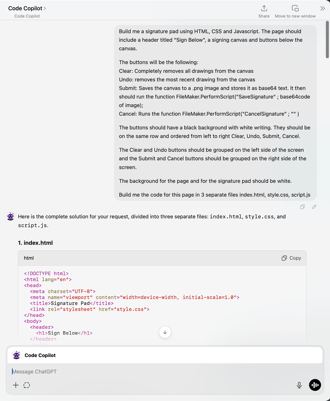
    • Good Example – “Build me a signature pad using HTML, CSS and Javascript. The page should include a header titled “Sign Below” a signing canvas and buttons below the canvas.

The buttons will be the following

Clear – Completely removes all drawings from the canvas

Undo – removes the most recent drawing from the canvas

Submit – Saves the canvas to a .png image and stores it as base64 text. It then should run the function FileMaker.PerformScript(“SaveSignature” ; base64code of image);

Cancel – Runs the function FileMaker.PerformScript(“CancelSignature” ; “” )

The buttons should have a black background with white writing. They should be on the same row and ordered from left to right Clear, Undo, Submit, Cancel. 

The Clear and Undo buttons should be grouped on the left side of the screen and the Submit and Cancel buttons should be grouped on the right side of the screen.

The background for the page and for the signature pad should be white.

Build me the code for this page in 3 separate files index.html, style.css, script.js“

  1. Provide Existing Code Snippets

    • If you’re modifying existing code, paste that code into ChatGPT’s prompt.

    • AI often “forgets” prior context or overwrites essential lines if you ask it to regenerate the entire codebase.

  2. Make Incremental Requests

    • After generating an initial version, ask for changes in small, specific steps (e.g., “reduce the button size,” “add rounded corners,” or “change the header’s font size”).

    • Requesting many modifications at once can confuse the AI and lead to broken or incomplete solutions.

  3. Ask for Only the Changes

    • Rather than asking for the entire file again, say “Please provide only the lines that need to be updated or added.”

    • This preserves previously working code and reduces the likelihood of accidental regressions.

  4. Avoid Complex Multi-tasking

    • AI code builders can lose track of context during multi-part tasks. Break them down into small, separate requests.

Step-by-Step Example – Building a Signature Pad in FileMaker

Goal – Create a signature pad that captures a user’s drawing, supports undo/clear, and saves the result as a base64-encoded image inside FileMaker.

  1. Outline Requirements

    • HTML – A simple layout with a canvas, header, and four buttons (Clear, Undo, Submit, Cancel).

    • CSS – Basic styling (button size, background color, alignment).

    • JavaScript – Canvas drawing logic (capturing strokes, undo/redo stacks), plus two FileMaker script calls

      • FileMaker.PerformScript(“Save Signature”, base64Code)

      • FileMaker.PerformScript(“Cancel Signature”)

  2. Create a Detailed Prompt
    In ChatGPT, specify –
    “Build me a signature pad using HTML, CSS, and JavaScript, including a header titled ‘Sign Below,’ a canvas, and four buttons. The ‘Submit’ button should encode the canvas as base64 and call FileMaker.PerformScript(“Save Signature”, <base64>), etc.”

  3. Generate Files
    ChatGPT returns – index.html (or combined HTML file)

    • style.css (for layout and styling)

    • script.js (draw logic and button handlers)

  4. Refine & Test

    • If the AI lumps HTML/CSS/JS together, ask for separate files or placeholders for easy inclusion in FileMaker fields.

    • Test your initial code locally (e.g., open the HTML in a browser). Check if Undo/Clear works and if Submit/Cancel behave as expected.

  5. Integrate Into FileMaker

    • Store the HTML, CSS, and JS in FileMaker fields.

    • Use a calculation field or a “web viewer” that substitutes in the CSS/JS code.

    • Ensure “Allow interaction” and “Allow JavaScript to perform FileMaker scripts” are enabled in the web viewer settings.

  6. Add Final Touches

    • Prompt ChatGPT for style updates (e.g., “Make the header smaller and unbold it,” “Group the Clear and Undo buttons on the left,” etc.).

    • Manually adjust any margins or design elements if ChatGPT’s output isn’t pixel-perfect.

Result: A working signature pad that you can open in FileMaker, draw on, and automatically store the output as a base64-encoded image—perfect for e-signatures or doodles.

Beyond Signatures – A Time-Tracking Example

The webinar also showcased a more advanced JavaScript widget – a time-tracking dashboard built entirely via AI-assisted code, then dropped into FileMaker. It features

  • Dynamic plus and delete buttons for line items

  • Light and dark modes

  • Start and Stop Timers

  • The entire front-end (HTML, CSS, JS) generated by ChatGPT with minimal manual intervention

This advanced use case illustrates how quickly you can evolve from small widgets (like a signature pad) to more complex applications—increasing interactivity and user experience within FileMaker, all powered by AI-generated front-end code.

Closing Thoughts

AI tools like ChatGPT can drastically reduce development time and open doors to front-end interactions you might not otherwise build by hand. The key is prompt engineering—learning how to give precise instructions and incremental feedback.

Remember

  • Always keep ethical, legal, and privacy considerations in mind.

  • Triple-check AI-generated code for security issues and correctness.

  • Use a “rinse and repeat” process – prompt, refine, test, and integrate.

By leveraging these best practices, you’ll be well on your way to creating powerful, user-friendly JavaScript widgets that enhance FileMaker’s functionality—without having to become a front-end development expert.

Further Resources

Have questions or want to share your own AI-generated FileMaker widget? Drop a comment or reach out to continue the conversation. Happy coding!


Can Your FileMaker Do This? Enhance Manufacturing Efficiency with AI-Powered Semantic Search

In modern manufacturing, quick and accurate access to data can make the difference between streamlined production and costly delays. Yet, traditional database search methods often fall short, requiring exact keywords and precise input. This is where AI-powered semantic search within Claris FileMaker solutions can transform operations, enabling users to retrieve information using natural language queries.

At Kyo Logic, we’ve implemented semantic search capabilities to revolutionize how manufacturers access and interact with their data. Let’s dive into how this technology works, its applications, and how it can improve your manufacturing processes.

What Is AI-Powered Semantic Search?

Semantic search goes beyond matching exact keywords by understanding the intent and context behind a query. It can also be combined with traditional search for even more uses. Powered by AI and natural language processing (NLP), semantic search interprets phrases, synonyms, and even contextual nuances. In FileMaker, this functionality can be achieved by integrating AI-powered tools like Claris Connect, external AI services (e.g., OpenAI APIs), or scripting custom machine-learning models.

For example:

  • Instead of searching “inventory: steel bolts 2mm,” users could type, “I need small steel bolts for automotive assembly.”
  • Semantic search understands “small” to mean “2mm” and “automotive assembly” to refine results to the relevant inventory category.

Use Case: Intelligent Inventory Management

One of the most impactful applications of semantic search is in inventory management, where manufacturers often deal with thousands of SKUs and components.

Scenario:

A manufacturer needs to locate specific materials—say, heat-resistant steel components for an automotive project. Traditional keyword searches might require exact terms like “steel component heat-resistant.” With semantic search, a user could simply query, “What materials can withstand high heat for automotive use?”

How It Works in FileMaker:

  1. Data Structuring: Inventory data is enriched with metadata, such as material properties, usage, and categories.
  2. AI Model Integration: A pre-trained NLP model is connected to FileMaker via an API or a microservice, such as OpenAI’s GPT API.
  3. Query Processing: When a user inputs a query, the system translates it into structured search parameters (e.g., “find all inventory tagged with ‘heat-resistant’ AND ‘automotive’”).
  4. Results Display: The system provides a ranked list of relevant inventory items, including links to more detailed specifications.

Benefits for Manufacturers

  1. Improved Data Retrieval:
    • Traditional searches depend on exact terms, which can lead to missed results. Semantic search captures broader intent, ensuring the right data is always accessible.
    • Example: A query like “fasteners for aerospace” can return bolts and rivets tagged with “aerospace grade.”
  2. Enhanced Decision-Making:
    • Rapid access to contextualized data allows engineers and managers to make timely and informed decisions, minimizing production bottlenecks.
    • Predictive models can suggest alternatives or complementary components.
  3. Operational Efficiency:
    • By reducing the time spent searching for information, semantic search enables staff to focus on high-value tasks, such as quality assurance or innovation.

Implementing Semantic Search in FileMaker

Here’s how you can get started:

  1. Audit Your Database:
    • Ensure your FileMaker database is well-structured and includes descriptive fields for metadata.
    • Example: Add fields like “material type,” “application,” and “specifications” to inventory tables.
  2. Connect to AI Tools:
    • Use Claris Connect or integrate external AI APIs for semantic processing.
    • Example: OpenAI’s API can process natural language queries and return contextually relevant results.
  3. Develop Custom Scripts:
    • Write FileMaker scripts that send queries to the AI tool, process results, and present them in a user-friendly interface.
    • Use custom layouts to display ranked search results dynamically.

Ready to Transform Your FileMaker System?

Semantic search isn’t just about searching smarter—it’s about enabling faster decisions and boosting operational efficiency. If you’re ready to explore how AI-driven capabilities can integrate into your FileMaker solution, contact us today for a consultation. Let’s take your manufacturing processes to the next level.