Installing Keycloak 26 on Ubuntu 24.04 (AWS)

At Kyo Logic, we specialize in custom software solutions and FileMaker consulting services. During one of our recent internal projects, a team member was experimenting with Keycloak 26 on AWS and decided to create a simple, repeatable guide for future reference. We’d like to thank our friends over at Sound Essentials, who provided instructions for installing Keycloak 17 on Ubuntu 20.04.3 LTS. Our instrcutsions would not be possible without their original guidance, which we’ve modified for our own purposes.
We realized it could be helpful to share this process more broadly. Below you’ll find a step-by-step outline of how to get Keycloak 26 up and running on an Ubuntu 24.04 server in AWS, complete with MySQL and SSL certificates managed by Certbot.
Please note that Keycloak is not a FileMaker-related tool. However, as consultants who often deal with diverse infrastructure solutions—ranging from identity management to custom app deployments—it’s important for us to have guides like this in our internal knowledge base. If you have any questions about this or about our FileMaker consulting services, reach out here.
Keycloak is a powerful open‐source identity and access management solution. In this tutorial, we’ll set up Keycloak 26 on an Ubuntu 24.04 server in AWS, secure it with SSL certificates via Certbot, and configure it to run on port 443. We’ll use MySQL as our database.
Note – This guide assumes you have an AWS account and are comfortable with launching EC2 instances and connecting to them. Replace keycloak.mydomain.com with your actual domain name wherever indicated.

What You Need To Get Started

  • A Linux server running Ubuntu 24.04 (x86) or an account to a server hosting platform such as AWS or Microsoft Azure
  • A Fully Qualified Domain Name (FQDN) and access to your domain’s Domain Name System (DNS)

1. Create Ubuntu Server

  • Below are instructions for creating a server using AWS EC2. The instructions should be similar for other services.

Launch a New EC2 Instance

  1. In AWS EC2, click Launch Instance
    • Select the following options
      1. AMI – Ubuntu 24.04 (x86)
      2. Instance Type – t3a.xlarge (or your preferred size)
      3. Key Pair – Select or create a new key pair
      4. Subnet – Choose an appropriate subnet (e.g., us-east-1c)
      5. Security Groups – Ensure you have rules for SSH (port 22), HTTP (port 80), and HTTPS (port 443 and 8443).
      6. Storage – ~30 GB recommended
      7. IAM Role – If you have an instance profile with needed permissions, select it here (optional but recommended).
  2. Create and Associate Elastic IP
    • Reserve a new Elastic IP in AWS
    • Associate it with your new EC2 instance
  3. In your DNS, create an A record for the IP Address of your Elastic IP using the subdomain of your choosing.
  4. Connect to EC2
    • Use AWS Systems Manager Session Manager or SSH, depending on your preference
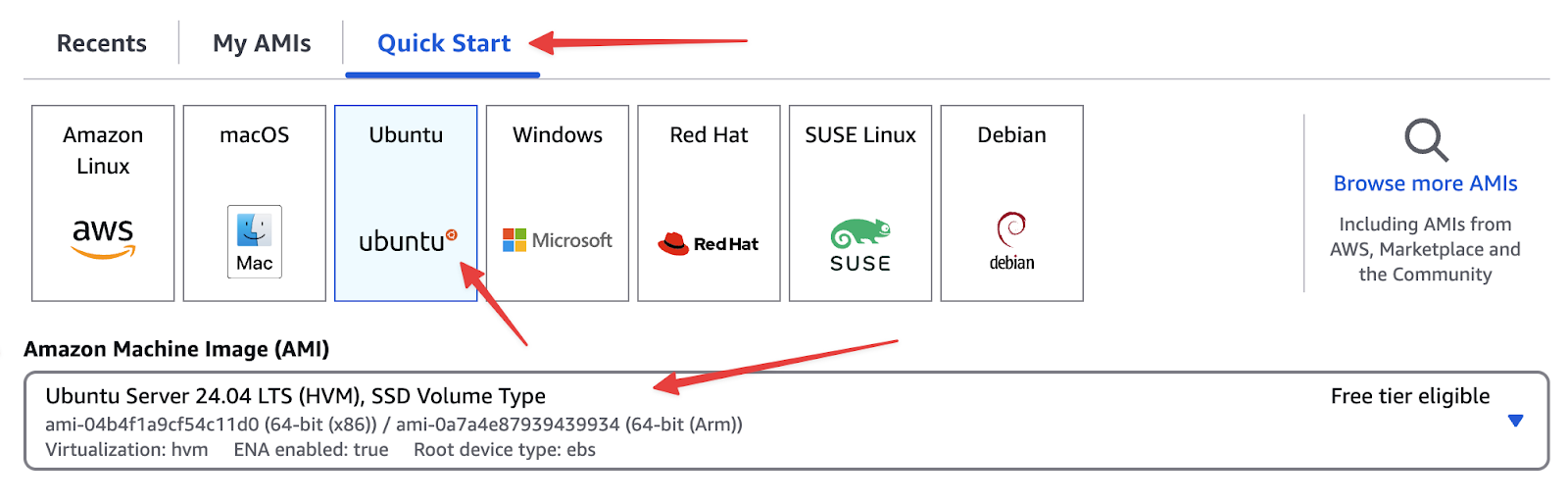
      1. If you click on Connect on the Instance, AWS will give you instructions to Connect.

2. Update Ubuntu

When first connecting, it’s best practice to update all packages with the following commands
sudo -i
sudo apt update
sudo apt upgrade
sudo apt dist-upgrade
sudo apt autoremove
sudo shutdown -r now
After the reboot, reconnect to your instance.

3. Install and Configure MySQL

Keycloak needs a database. Here’s how to install MySQL on Ubuntu
cd ~
sudo apt install mysql-server
sudo mysql
Set the root user’s MySQL password
ALTER USER 'root'@'localhost' IDENTIFIED WITH mysql_native_password BY 'MYSQL_DATABASE_PASSWORD';
Exit;
Secure the MySQL installation
sudo mysql_secure_installation
Follow the prompts (you can answer “Yes” to remove anonymous users, disallow root remote login, etc.).
Create the Keycloak database and user
sudo mysql -u root -pMYSQL_DATABASE_PASSWORD
In sql
CREATE DATABASE keycloak CHARACTER SET utf8mb4 COLLATE utf8mb4_unicode_ci;
CREATE USER 'keycloak'@'localhost' IDENTIFIED BY 'MYSQL_DATABASE_PASSWORD';
GRANT ALL PRIVILEGES ON keycloak.* TO 'keycloak'@'localhost';
FLUSH PRIVILEGES;
exit;
Note – Replace MYSQL_DATABASE_PASSWORD with a strong, unique password.

4. Install Certbot (for SSL Certificates)

We’ll use Certbot (via snap) to generate and manage SSL certificates.
cd ~
sudo snap install core
sudo snap refresh core
sudo snap install --classic certbot
sudo ln -s /snap/bin/certbot /usr/bin/certbot
sudo shutdown -r now
After the reboot, reconnect again.

5. Configure the Firewall

We’ll open only the necessary ports. Ubuntu’s default firewall tool is ufw
cd ~
sudo ufw allow ssh
sudo ufw allow 80/tcp
sudo ufw allow 8443/tcp
sudo ufw enable

6. Obtain an SSL Certificate

Choose your domain nameMake sure your DNS is pointed to the IP address of this instance (e.g., keycloak.mydomain.com).
Note – Replace keycloak.mydomain.com with your domain name. Obtain and verify certificate
cd ~
sudo certbot certonly --standalone --preferred-challenges http -d keycloak.mydomain.com --dry-run
If the dry run succeeds, run it again for the actual cert
sudo certbot certonly --standalone --preferred-challenges http -d keycloak.mydomain.com
Deny HTTP traffic (if desired)
sudo ufw deny 80/tcp
Enable auto-renewal
sudo systemctl list-units --type timer
sudo systemctl enable snap.certbot.renew.timer
sudo systemctl status snap.certbot.renew.timer
Configure Hooks for Auto-Renew
Certbot needs to open port 80 temporarily when renewing. Create pre- and post-hook scripts
cd /etc/letsencrypt/renewal-hooks/pre
sudo nano pre-hook.sh
Contents of pre-hook.sh
# Open port 80
ufw allow 80/tcp
Save (Ctrl+O, Enter) and exit (Ctrl+X). Then make executable
sudo chmod +x pre-hook.sh
cd /etc/letsencrypt/renewal-hooks/post
sudo nano post-hook.sh
Contents of post-hook.sh
# Close port 80
ufw deny 80/tcp
#Restart Keycloak
sudo systemctl restart keycloak
Save and exit, then make executable
sudo chmod +x post-hook.sh

Test renewal
sudo certbot renew --dry-run
This should restart your server

7. Install Java & Other Dependencies

Keycloak 26 requires Java 17 or later. Let’s install OpenJDK 21
sudo apt install openjdk-21-jdk

8. Download and Prepare Keycloak

sudo apt install zip
Create a directory and download Keycloak
sudo mkdir -p /opt/keycloak
cd /opt/keycloak
sudo wget https://github.com/keycloak/keycloak/releases/download/26.1.0/keycloak-26.1.0.zip
sudo unzip keycloak-26.1.0.zip -d /opt/keycloak
sudo rm keycloak-26.1.0.zip
Create Keycloak user and group
sudo groupadd -r keycloak
sudo useradd -r -g keycloak -d /opt/keycloak -s /sbin/nologin keycloak
Give keycloak user ownership and privileges to keycloak and letsencrypt
cd /opt
sudo chown -R keycloak: keycloak
sudo chmod -R 755 /opt/keycloak/keycloak-26.1.0/bin/
sudo chmod -R 755 /etc/letsencrypt


9. Configure Keycloak

Edit Keycloak configuration
sudo nano /opt/keycloak/keycloak-26.1.0/conf/keycloak.conf
Insert/Update
db=mysql
db-username=keycloak
db-password=MYSQL_DATABASE_PASSWORD
Note – (This is the password from above)
https-certificate-file=/etc/letsencrypt/live/keycloak.mydomain.com/fullchain.pem
https-certificate-key-file=/etc/letsencrypt/live/keycloak.mydomain.com/privkey.pem
hostname=keycloak.mydomain.com
Note – (Replace keycloak.mydomain.com with your domain name)
https-port=8443
Build and start Keycloak
cd /opt/keycloak/keycloak-26.1.0
sudo bin/kc.sh build
sudo -E bin/kc.sh bootstrap-admin user
Note – This is to create a temporary user for access to keycloak. Once in keycloak, it is recommended that a permanent user be created and this temporary user deleted.
sudo -E bin/kc.sh start
Keycloak should now be running on https://keycloak.mydomain.com:8443/. Log into keycloak using the account created above and create a new user. Make sure to give this new user all available roles.

10. Configure Keycloak to Start Automatically

Press Ctrl+C to stop Keycloak, then create a systemd service
Create systemd unit file
sudo nano /etc/systemd/system/keycloak.service
Sample Contents (adjust as needed)
# /etc/systemd/system/keycloak.service
[Unit]
Description=Keycloak Server
After=syslog.target network.target mysql.service
Before=httpd.service

[Service]
User=keycloak
Group=keycloak
SuccessExitStatus=0 143
ExecStart=!/opt/keycloak/keycloak-26.1.0/bin/kc.sh start

[Install]
WantedBy=multi-user.target
Enable and Reboot
sudo systemctl daemon-reload
sudo systemctl enable keycloak
sudo shutdown -r now
sudo systemctl status keycloak
Keycloak should now run automatically on system boot.

11. Changing to Port 443

Adjust keycloak.conf
sudo nano /opt/keycloak/keycloak-26.1.0/conf/keycloak.conf
Change (or add)
https-port=443
Rebuild Keycloak
cd /opt/keycloak/keycloak-26.1.0
sudo bin/kc.sh build
Update Firewall Rules
sudo ufw delete allow 8443/tcp
sudo ufw allow 443/tcp
sudo shutdown -r now
Keycloak will now listen on standard HTTPS port 443, accessible at https://keycloak.mydomain.com.
You’ve successfully installed Keycloak 26 on an Ubuntu 24.04 EC2 instance, configured MySQL as the backend, and secured Keycloak with a valid SSL certificate using Certbot. You also set up systemd to ensure Keycloak starts automatically on reboot and moved it to port 443 for a cleaner URL.
Next Steps
Log in to your Keycloak admin console at https://keycloak.mydomain.com using the admin username/password you created.
Configure your realms, clients, and identity providers as needed.
Review Keycloak logs and manage system resources to ensure optimal performance.
For more instructions on how to configure your keycloak account, you can follow the instructions from our CFDG presentation on the topic here – https://youtu.be/-bqww9ggDjA
With your identity and access management solution in place, you can focus on integrating Keycloak into your applications and services! If you have any questions or run into issues, consult the official Keycloak documentation or your AWS documentation for further guidance.
That’s it! You now have a working Keycloak 26 setup in AWS. If you have any questions—or if you’d like to learn more about our FileMaker consulting services—visit us here.

Can Your FileMaker Do This? Enhance Manufacturing Efficiency with AI-Powered Semantic Search

In modern manufacturing, quick and accurate access to data can make the difference between streamlined production and costly delays. Yet, traditional database search methods often fall short, requiring exact keywords and precise input. This is where AI-powered semantic search within Claris FileMaker solutions can transform operations, enabling users to retrieve information using natural language queries.

At Kyo Logic, we’ve implemented semantic search capabilities to revolutionize how manufacturers access and interact with their data. Let’s dive into how this technology works, its applications, and how it can improve your manufacturing processes.

What Is AI-Powered Semantic Search?

Semantic search goes beyond matching exact keywords by understanding the intent and context behind a query. It can also be combined with traditional search for even more uses. Powered by AI and natural language processing (NLP), semantic search interprets phrases, synonyms, and even contextual nuances. In FileMaker, this functionality can be achieved by integrating AI-powered tools like Claris Connect, external AI services (e.g., OpenAI APIs), or scripting custom machine-learning models.

For example:

  • Instead of searching “inventory: steel bolts 2mm,” users could type, “I need small steel bolts for automotive assembly.”
  • Semantic search understands “small” to mean “2mm” and “automotive assembly” to refine results to the relevant inventory category.

Use Case: Intelligent Inventory Management

One of the most impactful applications of semantic search is in inventory management, where manufacturers often deal with thousands of SKUs and components.

Scenario:

A manufacturer needs to locate specific materials—say, heat-resistant steel components for an automotive project. Traditional keyword searches might require exact terms like “steel component heat-resistant.” With semantic search, a user could simply query, “What materials can withstand high heat for automotive use?”

How It Works in FileMaker:

  1. Data Structuring: Inventory data is enriched with metadata, such as material properties, usage, and categories.
  2. AI Model Integration: A pre-trained NLP model is connected to FileMaker via an API or a microservice, such as OpenAI’s GPT API.
  3. Query Processing: When a user inputs a query, the system translates it into structured search parameters (e.g., “find all inventory tagged with ‘heat-resistant’ AND ‘automotive’”).
  4. Results Display: The system provides a ranked list of relevant inventory items, including links to more detailed specifications.

Benefits for Manufacturers

  1. Improved Data Retrieval:
    • Traditional searches depend on exact terms, which can lead to missed results. Semantic search captures broader intent, ensuring the right data is always accessible.
    • Example: A query like “fasteners for aerospace” can return bolts and rivets tagged with “aerospace grade.”
  2. Enhanced Decision-Making:
    • Rapid access to contextualized data allows engineers and managers to make timely and informed decisions, minimizing production bottlenecks.
    • Predictive models can suggest alternatives or complementary components.
  3. Operational Efficiency:
    • By reducing the time spent searching for information, semantic search enables staff to focus on high-value tasks, such as quality assurance or innovation.

Implementing Semantic Search in FileMaker

Here’s how you can get started:

  1. Audit Your Database:
    • Ensure your FileMaker database is well-structured and includes descriptive fields for metadata.
    • Example: Add fields like “material type,” “application,” and “specifications” to inventory tables.
  2. Connect to AI Tools:
    • Use Claris Connect or integrate external AI APIs for semantic processing.
    • Example: OpenAI’s API can process natural language queries and return contextually relevant results.
  3. Develop Custom Scripts:
    • Write FileMaker scripts that send queries to the AI tool, process results, and present them in a user-friendly interface.
    • Use custom layouts to display ranked search results dynamically.

Ready to Transform Your FileMaker System?

Semantic search isn’t just about searching smarter—it’s about enabling faster decisions and boosting operational efficiency. If you’re ready to explore how AI-driven capabilities can integrate into your FileMaker solution, contact us today for a consultation. Let’s take your manufacturing processes to the next level.


Customize Production Steps and Requirements

In custom manufacturing, the ability to adapt production workflows to meet unique client requirements is critical for success. Whether the project involves a one-of-a-kind prototype or a series of tailored specifications, flexibility in manufacturing processes ensures top-quality results and satisfied clients. Platforms like Claris FileMaker play a pivotal role in achieving this flexibility, offering manufacturers the tools to design custom workflows and meet specific production needs efficiently.

Tailoring Production Steps for Client Prototypes

Client prototypes often come with detailed specifications that require adjustments to standard production processes. Custom ERP systems, supported by tools like Claris FileMaker, allow manufacturers to design workflows tailored to each project. From automating unique quality checks to managing specialized technical documents and materials , these systems ensure that every step of the process aligns with client requirements. With this level of customization, manufacturers can confidently handle even the most complex prototypes.

Benefits of Meeting Unique Specifications

Tailoring production steps for individual prototypes brings numerous benefits. First, it enhances product quality by ensuring that all specifications are met precisely. Second, it strengthens client relationships by demonstrating a commitment to their unique needs. Finally, customized workflows improve efficiency by eliminating unnecessary steps and focusing on what matters most for each project. In a competitive market, these advantages can set manufacturers apart and foster long-term partnerships with clients.

How Claris FileMaker Powers Custom ERP Solutions

Claris FileMaker provides a versatile platform for creating ERP systems that support prototype-specific manufacturing workflows. Its intuitive design allows manufacturers to develop tailored solutions that adapt to diverse client needs. With Claris FileMaker, companies can integrate real-time data tracking, automate specialized tasks, and generate detailed reports to monitor progress and ensure quality. The platform’s flexibility ensures that each client’s vision is realized efficiently, without compromising on precision or standards.

Customizing production steps and requirements for client prototypes is essential for delivering exceptional results and building strong client relationships. With the support of Claris FileMaker, manufacturers can create tailored ERP solutions that enhance efficiency and meet even the most complex specifications. Interested to learn more about how Claris FileMaker can solve for custom manufacturing needs? Reach out to Kyo Logic here.


Manage Work Order Requirements and Milestones

Managing the production of client prototypes involves juggling numerous work order requirements, process milestones, and dependencies. Without full visibility into these elements, manufacturers risk inefficiencies and missed deadlines. Custom ERP solutions provide the tools needed to streamline these workflows, ensuring that projects stay on track. Claris FileMaker, with its robust customization capabilities, empowers manufacturers to manage prototype production with precision and clarity.

Managing Work Order Requirements

Every client prototype comes with unique specifications that must be carefully managed. Custom ERP systems allow manufacturers to define and track these detailed work order requirements,including technical documents, from material needs to specific production steps. By centralizing this information, manufacturers can ensure that every requirement is accounted for and seamlessly integrated into the production plan. This level of organization reduces errors and ensures that client expectations are consistently met.

Tracking Milestones and Dependencies

Production processes often involve multiple milestones and dependencies that must align for a project to succeed. Custom ERP solutions make it easy to monitor these critical points in the workflow. Whether it’s ensuring materials are available on time or coordinating different teams’ contributions, these systems provide real-time updates that keep production moving smoothly. By tracking milestones, manufacturers can quickly identify and address potential bottlenecks, minimizing delays and keep projects on schedule.

How Claris FileMaker Powers Custom ERP Solutions

Claris FileMaker offers a flexible platform for managing work order requirements, milestones, and dependencies. Its user-friendly interface allows manufacturers to design workflows that fit their unique needs, providing full visibility into prototype production. With features like automated notifications, real-time data tracking, and customizable dashboards, Claris FileMaker helps manufacturers streamline operations and ensure deadlines are consistently met. This comprehensive approach enhances efficiency and strengthens client satisfaction.

Conclusion

Managing work order requirements and milestones is essential for ensuring the success of custom prototype production. Claris FileMaker simplifies this process by providing full production visibility and the tools needed to streamline workflows, minimize delays, and meet deadlines. Interested to learn more about how Claris FileMaker can solve for work order management? Reach out to Kyo Logic here.


Maintain Historical Records for Future Reference and Replication

In custom manufacturing, maintaining detailed historical records is key to ensuring consistency and efficiency in production. These records provide valuable insights, allowing manufacturers to replicate successful production runs and quickly troubleshoot issues when they arise. Over time, this practice supports continuous improvement, helping manufacturers refine processes and deliver high-quality products consistently.

Of course, detailed documentation can be a massive drain on time and resources, especially because it’s oftentimes key personnel required to do it. But with software like Claris Filemaker, aspects of this documentation can be streamlined and even automated.

The Role of Historical Records in Manufacturing

Historical records serve as a roadmap for manufacturers. They document every step of the production process, capturing critical test results and production variables.There’s a record of anything being produced. More data means larger, more detailed libraries and documentation. For example, when a product meets quality standards, these records become a template for future runs, reducing the risk of errors and ensuring consistency. Conversely, when problems occur, historical data offers a clear path to identifying and resolving the root cause. This dual role of replication and troubleshooting makes historical records an indispensable tool in manufacturing. 

Benefits of Systematic Record-Keeping

Systematic record-keeping brings structure and accessibility to historical data, making it easier to analyze and apply. Manufacturers can track long-term trends, identify areas for improvement, and implement best practices based on past successes. Furthermore, accessible records facilitate employee training by providing a reference point for standard operating procedures. This ensures that quality standards are maintained as teams grow or evolve. With well-maintained historical records, manufacturers gain a competitive edge by optimizing efficiency and reducing variability in their processes.

How Claris FileMaker Facilitates Historical Record Management

Claris FileMaker offers a powerful solution for managing historical manufacturing records. Its customizable database platform allows manufacturers to organize, store, and retrieve data effortlessly. Claris FileMaker’s user-friendly interface makes it easy to design workflows tailored to specific production needs, ensuring that all relevant information is captured and readily available. With advanced search capabilities and real-time updates, Claris FileMaker helps manufacturers stay proactive, whether replicating a successful run or addressing an unexpected challenge. By centralizing data, Claris FileMaker streamlines record management and supports long-term operational excellence.

Maintaining historical records is essential for replicating successful production runs, troubleshooting issues, and driving continuous improvement in custom manufacturing. With Claris FileMaker’s customizable solutions, manufacturers can efficiently manage their data and ensure consistent quality over time. Interested to learn more about how Claris FileMaker can solve for historical record management? Reach out to Kyo Logic here.


Gather Real-Time Production Statistics

In custom manufacturing, maintaining high-quality standards requires precise and reliable data tracking. Accurate documentation of test results for each day and test run ensures that manufacturers can identify trends, address issues promptly, and make precise production adjustments. Custom ERP solutions provide the tools needed to achieve this level of granularity, transforming how manufacturers manage and analyze quality data.

The Importance of Granular Test Results

Granular test result tracking is essential for identifying patterns and maintaining consistent quality. By recording data for each production run, manufacturers can pinpoint the exact moment when deviations occur, helping them take immediate corrective action. This detailed approach not only prevents larger quality issues but also provides valuable insights for optimizing production workflows. With granular tracking, manufacturers can ensure that every product meets rigorous quality standards.

Advantages of Custom ERP Solutions

Custom ERP solutions simplify the process of recording and analyzing test results. Unlike generic software, custom ERP systems are designed to meet the unique needs of each manufacturer, offering features like automated data entry, real-time monitoring, and customizable reports. These systems streamline quality tracking and enable faster, more informed decision-making. By leveraging a tailored ERP solution, manufacturers can reduce waste, improve efficiency, and maintain a competitive edge in the market.

How FileMaker Supports Custom ERP Development

FileMaker provides an adaptable platform for building custom ERP solutions that meet the specific needs of manufacturers. Its intuitive interface allows businesses to design and adapt workflows that capture and organize test results efficiently. From real-time data logging to detailed reporting, FileMaker enables manufacturers to manage quality control with precision and ease. With its robust integration capabilities, FileMaker ensures seamless communication between quality tracking and production processes, helping manufacturers stay agile and compliant.

Recording specific test results by day and production run is crucial for enhancing quality tracking and enabling precise production adjustments. What’s even more exciting is this information can be used to develop and train AI. 


Custom ERP solutions, especially those built with FileMaker, empower manufacturers to achieve this level of detail and improve their overall production processes. Interested to learn more about how FileMaker can solve for custom ERP needs? Reach out to Kyo Logic here.


Replacing Manual Data Collection

When it comes to manufacturing, efficiency and precision are critical for maintaining a competitive edge. Yet, many companies still rely on manual data collection methods, which can lead to errors, delays, and inconsistencies. As production demands increase, these outdated practices hinder the ability to meet quality standards and maintain smooth operations. The solution? Automated data collection systems. These systems not only streamline the gathering of test results but also enhance standardization, consistency, and real-time tracking when integrated with production applications.

The Drawbacks of Manual Data Collection

Manual data collection is inherently flawed due to its reliance on human input. Errors in recording or transferring data can result in costly mistakes, from production delays to defective products reaching customers. Additionally, manual processes are time-intensive, slowing down production lines and creating bottlenecks. These inefficiencies make it challenging for manufacturers to adapt to fluctuating demands and rigorous quality control requirements.

The Benefits of Automated Data Collection

Automating data collection brings a host of benefits to manufacturing quality control. By using sensors and digital tools to capture data directly from work areas, manufacturers can reduce errors and ensure accuracy. Automation also accelerates the collection process, allowing operators to focus on more critical tasks. Beyond efficiency, automated systems provide real-time insights, empowering decision-makers to address issues before they escalate. This ensures that production stays on track, with consistent quality and minimal downtime.

Integration with Production Applications

The real power of automated data collection lies in its integration with production applications. This synergy allows for seamless data standardization, ensuring that all test results and quality metrics align with regulatory and internal standards. Integrated systems enable manufacturers to track data in real time, offering instant feedback on production performance. Any deviations from set standards are immediately flagged, enabling swift corrective actions. Moreover, this connectivity enhances traceability, which is essential for audits and compliance in industries like automotive, aerospace, and pharmaceuticals.

How FileMaker Can Help

FileMaker offers a powerful, customizable platform for managing automated data collection and integration with production applications. Its flexible interface allows manufacturers to design tailored solutions that meet specific quality control needs. From real-time tracking to automated reporting, FileMaker streamlines the entire data management process, ensuring consistent results and reducing operational inefficiencies. With FileMaker, manufacturers can quickly adapt to changing demands while maintaining high standards of quality.

Conclusion

Replacing manual data collection with automated systems is a transformative step for modern manufacturers. These technologies streamline processes, improve data accuracy, and provide real-time insights that drive better decision-making. When integrated with production applications, automation ensures consistency and enhances overall efficiency. Interested to learn more about how FileMaker can solve for manufacturing quality control? Reach out to Kyo Logic here.


Integration with Production Application

In today’s manufacturing landscape, maintaining high standards of quality control is essential for staying competitive. Yet, many companies struggle with quality checks that are disconnected from their production processes, leading to inefficiencies and inconsistencies. Integrating quality control with the production application offers a seamless solution that automates testing, ensures consistent standards, and improves overall efficiency.

Why Integration Matters

Quality control processes that operate independently of production can introduce variability, leading to inconsistent test results and compromised product quality. By integrating quality control directly with production applications, manufacturers create a unified system that ensures every stage of production adheres to the same standards. This connection enables real-time monitoring, which helps identify and resolve issues immediately, reducing waste and minimizing downtime.

Benefits of Automation in Testing

Automation is a game-changer in quality control. It replaces repetitive, manual tasks with reliable, technology-driven solutions that streamline the testing process. Automated systems not only ensure precision but also enhance the speed of quality checks, enabling manufacturers to meet high production demands without sacrificing accuracy. Moreover, automation eliminates human error, providing confidence that each product meets stringent quality standards.

How FileMaker Supports Integration

FileMaker is an ideal platform for integrating quality control with production applications. Its customizable interface allows manufacturers to design solutions tailored to their specific needs, including automated workflows, real-time data tracking, and seamless communication between quality control and production systems. With FileMaker, companies can standardize their quality checks, ensure data accuracy, and enhance traceability—critical for industries that require compliance with strict regulations.

Conclusion

Integrating quality control with production applications transforms the manufacturing process by automating testing and maintaining consistent standards. This seamless connection improves efficiency, reduces variability, and ensures products meet the highest quality expectations. Interested to learn more about how FileMaker can solve for quality control integration? Reach out to Kyo Logic here.


Plowshare

Overview

Plowshare, a subsidiary of Publicis, is a media placement & communications agency . What makes them special isn’t just their offerings, it’s their clients. Plowshare works exclusively with the federal government and nonprofits, seeking out and supporting clients that work to drive social good and meaningful change. They’ve worked with dozens of impactful clients, including the Wounded Warrior Project, Girl Scouts of USA, March of Dimes, The US Marines, and the Special Olympics.

The Challenge

For the past 20+ years, Plowshare have worked tirelessly to get their clients ad time for a fraction of the traditional cost. This meant either leveraging the cause and finding broadcasting networks that wanted to champion that particular nonprofit, or finding blocks of unpurchased ad space and negotiating a reduced or a free “donated” rate.
Given the nature of the clients, stretching media budgets is crucial . And in instances where it isn’t, money saved on marketing and ad purchases can be used for great causes elsewhere. While Plowshare had found tremendous success with their current processes and models, there were opportunities to optimize data sets– media monitoring, campaign tracking, and data analysis services would provide more value for client’s media budgets. Furthermore, it would mean lower overall costs, higher efficiency, and faster results. While Plowshare recognized the benefits of implementing these practices, they didn’t have a path forward with their current toolset and infrastructure.

The Task

Plowshare contacted us to see how customized tools could help streamline and optimize their media monitoring & campaign performance measurement processes. New technology is critical in their space, and any kind of new offerings, particularly in tracking ad placements, would give them an edge.

Our Process

We worked very closely with internal teams to identify needs, pain points, and potential blind spots. Over the course of development, we shared progress with the Plowshare team to allow them the opportunity to give input and redefine goals as needed. This iterative process allowed them to continuously shape the direction of the project as new needs were identified.

Impact

Not only were we able to streamline their processes, we created a new system that automated virtually all of their back-office performance reporting & campaign tracking work synchronizing fresh data to the web on a weekly basis. On top of this, it allowed clients real-time access to previously unavailable data. This powerful system ensured that their clients were always receiving up-to-date reporting on the success of their resources. This system was, in part, what led them to be acquired by the media giant Publicis in 2017.The system continues to be used to this day and is a backbone of their offering.

Real-Time Access

to campaign results data

Full Automated

web synchronization

Company Success

purchased by Publicis in 2017

Plowshare Group was only successful because of the technology tools Kyo Logic developed. In our industry, we need to keep up with the times, report live, and constantly develop things no one else is doing. Our biggest clients have stayed with us because we have maintained this standard.

Tom Derreaux
Executive Vice President, Plowshare

Haccah

Haccah

Location
Nationwide
Time Frame
6 Months
Industry
Education
Contact Us

Overview

Haccah provides testing, analysis, and organization applications for professional psychology, therapy, and psychiatry practices. Their testing, typically behavioral testing, is administered to end patients by teachers, agencies, or psychologists.
Haccah’s application gathers these tests and assesses the applicants against specific diagnoses, analyzing them in large data sets and ultimately producing an output with detailed feedback.
Haccah uses a central FileMaker system to store test results and assess patients against specific diagnoses. The system leverages large data sets to produce test outputs with detailed feedback.
This application supports several hundred tests that cover a broad range of behavioral testing, including psychological, academic, medical, and more.

The Challenge

Haccah’s clients needed additional utility from the platform: More tests, forms, and responses. Unfortunately, the system was not designed for such an expansive suite of options and ran slowly.
The application itself took several minutes to open. It would often freeze during use and be prone to crashing. Clients expressed concern about the application’s performance: the content was valuable, but the system needed a revamp.
Haccah considered replacing the entire system at a significant cost and major disruption to their business. The system incorporated thousands of hours of accumulated knowledge and expertise and had significant business value if saved.

The Task

Before creating a new system from scratch, Haccah tasked Kyo Logic with reviewing and, if possible, overhauling the existing platform to improve performance and preserve their valuable data.

Our Process

Kyo Logic’s initial analysis showed that the existing system structure incorporated too many internal dependencies for Haccah’s older FileMaker system to handle at scale. Every change in the system caused a cascade of internal recalculations amounting to tens of thousands of real-time updates. These recalculations created major performance bottlenecks.
Luckily, fixing the internal dependencies would cost a fraction of replacing the entire system and could be completed in a few hundred hours of work. After demonstrating how dependency fixes could reduce load time from minutes to seconds, the Kyo Logic team worked on 4 – 5 high-impact change areas.
The focus was first to tackle the most used sections of the application. This process showed immediate results and improved the application to a point where results were apparent internally and with end clients.

Impact

 
With the recommended changes, the time to output final reports was reduced from 7 minutes to 17 seconds – a 1400x improvement. The time to open the application was reduced from over 1.5 minutes to 5 seconds.
 
Haccah saved their application and core business at a fraction of the cost of developing a new database application.
 
Working with a skilled internal team allowed Haccah to make required large-scale changes rapidly. Significant impact was experienced quickly by focusing on the most trafficked areas first.
 
Moving forward, the Kyo team looks forward to optimizing Haccah’s system and leveraging the power of Claris’ newer suite of tools to offer even more powerful functionality, ease of use, and value.

1400x Speed Increase

7 minutes to 17 seconds

1.5 Minutes to 5 Seconds

Time Taken to Open Application

6 Months Training

From Project Start to Launch

I don’t know of another program that can integrate quite like FileMaker does.

Kyo is very pleasant to deal with, listens well and communicates at a level that meets each person’s (client’s users) level of understanding.

Dr. James R. Harrison
Clinical Director