Keep up to date with the latest news and thought leadership.
Free FileMaker add-on
Add field-level accountability and record restore points without building a custom history system from scratch.
FileMaker does not include audit logging or version history out of the box, and building either one yourself is a bigger project than it looks. Kyo Logic’s Audit Log & Version History add-on gives your FileMaker solution both in a few minutes of setup: a filterable log of every field-level change, plus optional record versioning that lets you restore an entire record to an earlier state at the click of a button.
Here is the moment this add-on exists for. A quantity on an order is wrong. The customer says they never approved the change. Three people had the record open this week, and every one of them says it was not me. Without an audit log, that conversation goes nowhere. With one, you open the log, filter to the order, and see the field, the old value, the new value, who made the edit, and when.
Audit logs and versioning are not native FileMaker features, and they are not easy to implement well. A homegrown approach usually means a separate history table, scripted writes on every layout, and careful handling of edge cases like deletions and related records.
The harder problem is maintenance. Most audit tools, homegrown or otherwise, need constant attention as the solution grows. Add a field and someone has to remember to log it. Add a table and someone has to wire it in. The log quietly falls behind the schema, and the gaps only surface when you need the history you did not capture.
The add-on is built to avoid that trap. It takes only a few minutes to set up and runs seamlessly from there.
The core functionality covers the cases a homegrown script usually misses:
A user edits a record
↓
Every changed non-container field is captured with its value
↓
The log records who made the change and when
↓
An authorized user can view and filter the history
Setup is two script triggers, not a rebuild
To begin logging on a new table or section of your solution, only two script triggers are required. That is the whole integration step. No per-field configuration, no rebuilding layouts, no audit schema to design. It also means the add-on keeps up as your solution grows: bringing a new table under logging is minutes of work, not a project.
Many edits that matter do not happen on the record you are looking at. An order looks untouched while its line items changed underneath it. Related Record Logging, the first of two optional features, extends the audit trail across those relationships:
Record Versioning & Restoration is the second optional feature, and it turns the audit trail into an undo button. When any change is made, the add-on stores the previous version of the record: who made the edit, when, and the value of all fields unless you have excluded them from logging. When Related Record Logging is enabled, versioning covers related records as well.
Every stored version is a restore point. At the click of a button, you can revert an entire record back to an earlier state. Versions are viewable and searchable, so recovering from a bad import or an accidental edit starts with finding the right moment in time, not reconstructing it from memory.
A record is about to change
↓
The previous version is stored, with who, when, and every field value
↓
Versions accumulate as a searchable history
↓
One click restores the record to any earlier state
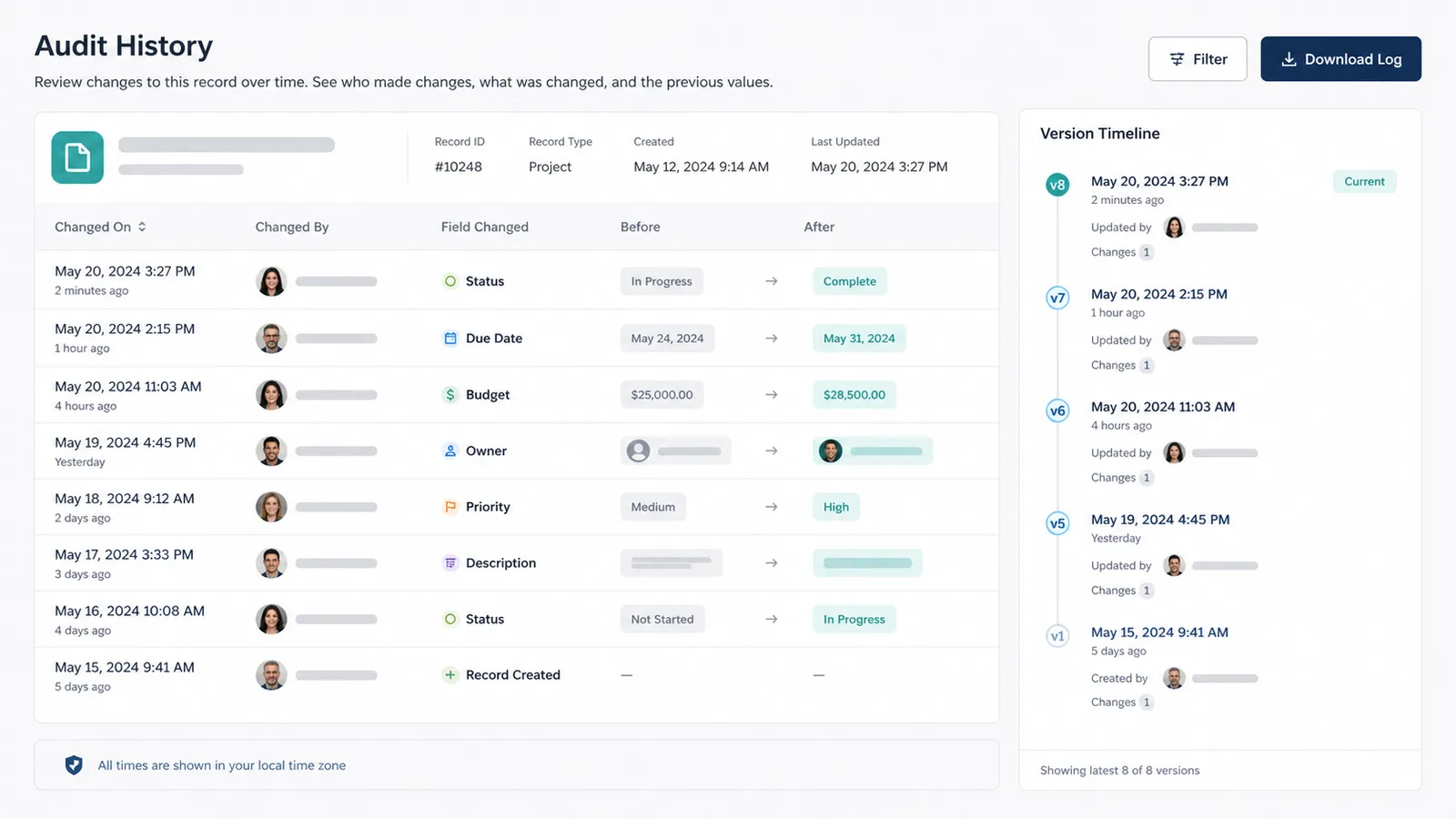
For most teams, the payoff shows up in three places. Troubleshooting gets faster because the log answers what changed before anyone starts guessing. Accountability gets easier because who and when are recorded facts instead of recollections. And recovery gets safer because restoring a record is a click, not a manual re-entry from a backup.
Kyo Logic builds custom Claris FileMaker and manufacturing software for businesses across New England and beyond, and the Audit Log & Version History add-on comes from the same place as the rest of our work: problems our clients actually hit. If you want to see the add-on running against a real solution, or you want help deciding which tables deserve logging first, reach out. Setup takes minutes. The first time it answers who changed this, it will have paid for itself.
Does FileMaker have built-in audit logging?
No. FileMaker does not natively track field-level changes or record versions. Audit logging requires either a custom build or an add-on like Kyo Logic’s Audit Log & Version History tool.
What does the add-on capture when a record changes?
It logs the value of every non-container field that changed in the table, along with who made the change and when, even if the field is not on the current layout. Summary fields, calculations, globals, and record metadata can be included or excluded by naming convention.
Can I undo a change to a record?
Yes, with the optional Record Versioning & Restoration feature. Every change stores the previous version of the record as a restore point, and you can revert the entire record to any earlier state at the click of a button.
How much work is it to add logging to a new table?
Two script triggers. Related record logging for a table is included or excluded by changing one script step.

Patrick is an intelligent and quick-thinking problem solver who thrives under pressure, priding himself on his promptness and analytical skills. He enjoys learning new things and tackling challenges that keep his mind sharp. Outside of work, he values time with family and friends, enjoys playing and watching sports, and is actively involved in his church. With a strategic mindset and a great sense of humor, Patrick prefers the comforts of home, where he can watch a great movie, design and play board games, or take on a challenging jigsaw puzzle.