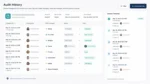
As the year wraps up, customer data becomes one of the most valuable assets a business can analyze. Understanding who your best customers are, where churn risk exists, and how behavior has changed year over year is critical for planning retention strategies and revenue growth in the coming year.
With Claris FileMaker, organizations can centralize customer data and use dynamic dashboards to surface insights around performance, lifetime value, churn risk, and long-term trends without exporting data to spreadsheets or external BI tools.
Identify Your Best Customers and Highest Lifetime Value
FileMaker dashboards can automatically rank customers based on metrics such as:
- Total annual revenue
- Purchase frequency
- Average order value
- Contract value or renewal history
- Long-term lifetime value (LTV)
By consolidating sales, billing, and engagement data, FileMaker makes it easy to see which customers drive the most value and which relationships are worth expanding further in the new year.
Spot Churn Risk Before It Becomes a Problem
Churn often shows warning signs long before a customer leaves. FileMaker can analyze indicators such as:
- Declining order frequency
- Reduced spend compared to prior periods
- Missed renewals or delayed payments
- Decreased engagement or activity
Dashboards can automatically flag at-risk customers, allowing teams to prioritize outreach, retention offers, or account reviews before revenue is lost.
Analyze Year-Over-Year Customer Trends
Year-end analysis isn’t just about individual customers—it’s also about understanding broader patterns. FileMaker enables teams to track:
- Year-over-year revenue changes by customer segment
- Shifts in buying behavior or product mix
- Geographic or industry-level performance trends
- Growth or contraction across customer cohorts
These insights help leadership teams understand what changed during the year and how customer behavior is evolving.
Build Dashboards That Update in Real Time
Because FileMaker dashboards are connected directly to live data, customer analysis updates automatically as records change. Teams can create:
- Executive-level customer performance summaries
- Sales dashboards by territory or account owner
- Retention and churn monitoring views
- Account-level customer health reports
All without maintaining separate spreadsheets or manual reporting processes.
Why It Matters
End-of-year customer analysis with FileMaker helps organizations:
- Focus retention efforts where they matter most
- Identify upsell and expansion opportunities
- Reduce churn risk heading into the new year
- Base planning decisions on real data, not assumptions
- Align sales, marketing, and customer success teams
Instead of reacting to churn after it happens, businesses can plan proactively using accurate, centralized insights.
Claris FileMaker empowers organizations to transform year-end customer data into meaningful insights. By surfacing top performers, churn risk, lifetime value, and year-over-year trends through live dashboards, FileMaker helps teams enter the new year with clarity and confidence.
Interested in building customer analytics dashboards with Claris FileMaker? Reach out to Kyo Logic here.